
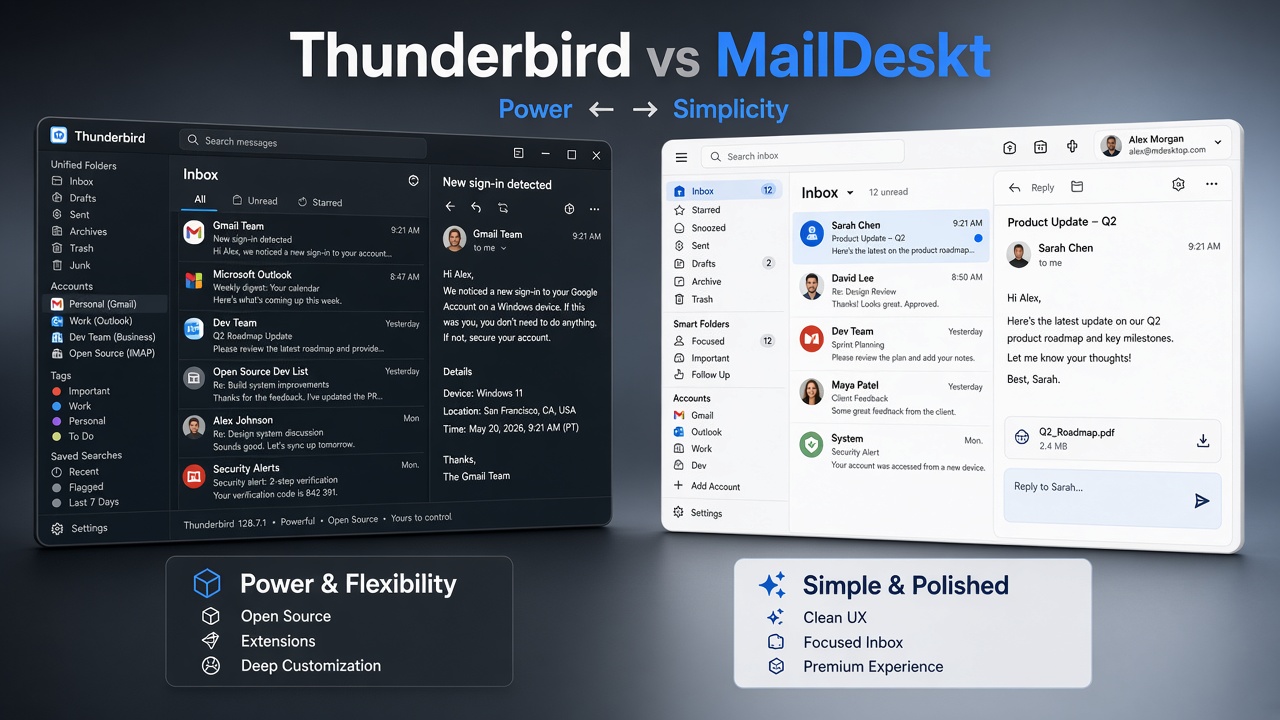
Looking for a Thunderbird alternative with a cleaner, more modern email experience?
Thunderbird remains one of the most capable desktop email clients available. It offers powerful features, extensive customization, and a large ecosystem built around its open-source foundation.
But choosing an email client isn’t only about features.
It’s also about how the application feels to use every day.
That’s where MailDeskt takes a different approach.
MailDeskt is designed around a clean, polished, and focused desktop email experience. Instead of putting every possible feature and setting in front of you, it keeps the inbox at the center of the experience.
If you want your email application to feel less like a traditional utility and more like a modern desktop app, MailDeskt is worth a look.
MailDeskt vs Thunderbird: Two Different Approaches
The biggest difference between MailDeskt and Thunderbird isn’t simply the number of features.
It’s the user experience.
Thunderbird is designed for users who want control. Its settings, customization options, and add-on ecosystem allow users to build a highly personalized email workflow.
MailDeskt takes a more focused approach.
Its interface is designed to keep the inbox at the center, with a clean visual hierarchy and less visual complexity.
The result is two desktop email clients with very different philosophies.
| Feature | MailDeskt | Thunderbird |
|---|---|---|
| Desktop email | Yes | Yes |
| Multiple accounts | Yes | Yes |
| Gmail | Yes | Yes |
| Outlook | Yes | Yes |
| Resend | Yes | — |
| Open source | — | Yes |
| Extensions | — | Yes |
| Extensive customization | — | Yes |
| Clean, focused interface | Yes | Yes |
| Premium-style UX | Yes | — |
The right choice depends on what matters most to you: maximum flexibility or a more focused experience.
A Cleaner and More Premium Email Experience
One reason to consider MailDeskt as a Thunderbird alternative is its approach to design.
Email is something many people use throughout the day. That makes the quality of the interface more important than it might initially seem.
A cluttered interface can make simple tasks feel more complicated.
A well-designed email client should make it easy to understand:
- Which messages need your attention
- Which account you’re using
- Where your folders are
- How to compose a message
- How to search your inbox
- What to do next
MailDeskt is designed around that principle.
The goal isn’t simply to make an email application look attractive. It’s to create an experience that feels clean, calm, polished, and easy to navigate.
That’s what gives MailDeskt its more premium feel.
UX Matters More Than a Feature Checklist
When comparing email clients, it’s easy to focus entirely on features.
Does it support a particular protocol?
Does it have a certain setting?
Is there an extension for a specific task?
Those questions matter, particularly for advanced users.
But there’s another question worth asking:
Do you actually enjoy using your email client?
A desktop email application may be something you open dozens of times every day. Small UX decisions add up.
Navigation, spacing, typography, visual hierarchy, account switching, message organization, and the overall feel of the application can make everyday email either pleasant or frustrating.
That’s where MailDeskt takes a different approach.
Thunderbird Is Powerful. MailDeskt Is Focused.
Thunderbird’s strength is flexibility.
You can customize the application extensively and extend its functionality through its ecosystem.
For power users, that’s a major advantage.
But more flexibility can also mean more complexity.
MailDeskt takes a different path.
Instead of trying to become the most customizable email client, it focuses on making the essential email experience feel simple, modern, and polished.
If you don’t need dozens of settings or extensions, that focused approach can be an advantage.
MailDeskt for Multiple Email Accounts
Managing multiple email accounts is one of the main reasons people use desktop email clients.
You might have a personal account, a work account, and separate accounts for projects or businesses.
Both Thunderbird and MailDeskt can bring multiple accounts together.
The difference is how you interact with them.
Thunderbird provides advanced users with extensive account configuration.
MailDeskt focuses on making multiple accounts feel like part of one clean desktop experience.
If you’re searching for a Thunderbird alternative for multiple accounts, the choice comes down to whether you prefer extensive configuration or a simpler workflow.
Gmail, Outlook, and Resend
MailDeskt supports services including Gmail, Outlook, and Resend.
This makes it suitable for a mix of traditional email accounts and modern developer-focused workflows.
Resend is particularly relevant for developers and teams working with transactional email infrastructure.
Thunderbird, meanwhile, is a general-purpose email client designed to support a broad range of users and workflows.
If you want a traditional, highly configurable email application, Thunderbird remains compelling.
If you want a modern interface that brings your email accounts together in a more focused environment, MailDeskt offers a different option.
Is MailDeskt a Good Thunderbird Alternative?
That depends on what you’re looking for.
Thunderbird may be the better choice if you want:
- Maximum customization
- Open-source software
- A large extension ecosystem
- Advanced email functionality
- Detailed account configuration
- A mature desktop email application
MailDeskt may be the better fit if you care more about:
- Clean design
- A polished interface
- Simplicity
- A focused inbox
- Multiple email accounts
- Gmail and Outlook support
- Resend support
- A more premium desktop experience
That’s the real distinction.
MailDeskt isn’t trying to win by offering the most settings.
It’s trying to make everyday email feel simpler, cleaner, and more enjoyable.
MailDeskt vs Thunderbird: Which Should You Choose?
If you are a power user who wants to customize almost every part of your email workflow, Thunderbird remains an excellent choice.
If you find traditional desktop email clients too complicated and want a more modern interface, MailDeskt may be the better option.
Think of it this way:
Thunderbird is about power and flexibility.
MailDeskt is about simplicity and polish.
Neither approach is right for everyone.
The best email client is the one that fits the way you actually work.
Final Verdict
Thunderbird and MailDeskt represent two different philosophies of desktop email.
Thunderbird prioritizes power, flexibility, and customization.
MailDeskt prioritizes simplicity, clean design, and a more polished desktop experience.
If you’ve been looking for a Thunderbird alternative that feels cleaner, more modern, and more premium, MailDeskt is worth exploring.
And you don’t have to make the decision based on a comparison article.
Try it yourself.
Try MailDeskt Free for 7 Days
Want to experience a cleaner and more premium desktop email client?
Download MailDeskt and get 7 days of free access with the full experience unlocked.
After the trial, you can unlock MailDeskt for $49 — 30% off the regular price.
Try the full experience, connect your accounts, and see whether MailDeskt is the right Thunderbird alternative for you.
Start your 7-day free trial and experience MailDeskt for yourself.
7 days free · Full access · $49 · Save 30%
Leave a Reply