
If you’re building a SaaS product, website, or application, you’ve probably come across Resend.
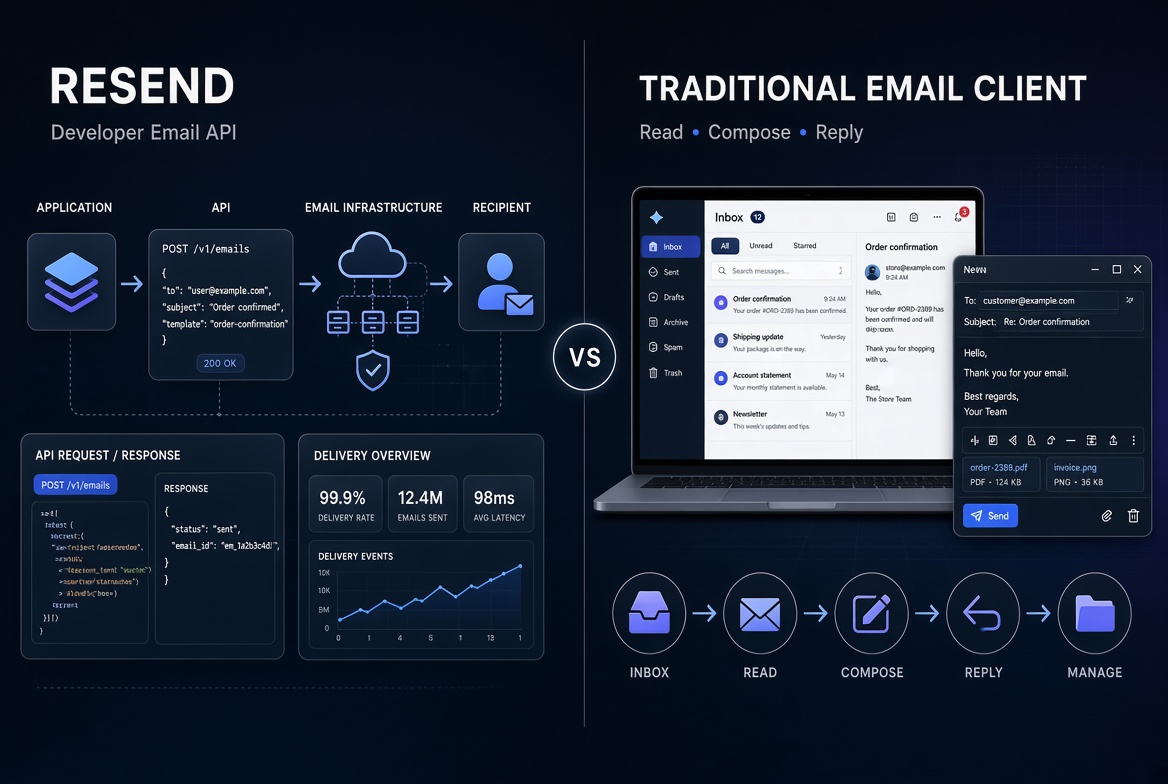
Resend is built for developers who need to send transactional emails from their applications. Traditional email clients, on the other hand, are designed for people who need to read, write, organize, and reply to emails.
So, what’s the difference between Resend and a traditional email client?
And if you’re already using Resend, do you need an email client as well?
Let’s break it down.
What Is Resend?
Resend is an email platform designed primarily for developers.
It provides APIs and developer-focused tools for sending emails from applications.
For example, your application might use Resend to send:
- Account verification emails
- Password reset emails
- Welcome emails
- Order confirmations
- Notifications
- Invoices
- Contact-form messages
- SaaS application emails
A typical application sends an email through an API rather than through a traditional email application.
For developers, this makes Resend useful because email delivery can be integrated directly into an application.
What Is a Traditional Email Client?
Traditional email clients are designed around the user’s inbox.
Examples include applications such as Outlook, Apple Mail, and Thunderbird.
Their main purpose is to let you:
- Read emails
- Send emails
- Reply to messages
- Organize conversations
- Search your mailbox
- Manage attachments
- Receive notifications
In other words, a traditional email client is primarily a human-facing email application.
Resend and traditional email clients therefore solve different problems.
Resend vs Traditional Email Clients
Here’s a simple comparison:
| Feature | Resend | Traditional Email Client |
|---|---|---|
| Designed for developers | Yes | Usually no |
| API-based sending | Yes | Usually not the primary purpose |
| Application emails | Yes | No |
| Read incoming emails | Limited / platform-dependent | Yes |
| Compose emails manually | Not the main focus | Yes |
| Reply to emails | Not the main focus | Yes |
| Multiple inbox management | Project/API based | Usually account based |
| Transactional email | Yes | No |
| Desktop workflow | Not the primary focus | Yes |
| Developer integration | Yes | Limited |
The important point is that these tools don’t necessarily compete directly.
They can complement each other.
Why Developers Using Resend May Still Want an Email Client
Imagine you’re running three SaaS products.
Each product has its own Resend project.
Your applications send emails such as:
hello@company.comsupport@product.comnotifications@service.com
Your applications may be successfully sending emails through Resend, but you may still need to read incoming messages and respond to customers.
That’s where a desktop email client can become useful.
Instead of thinking about Resend as a replacement for email software, think of it as the email infrastructure behind your applications.
An email client can provide the human-facing interface.
The Problem With Switching Between Multiple Projects
Developers who manage multiple projects often end up switching between dashboards, browser tabs, accounts, and API credentials.
That can become inconvenient when you simply want to check an incoming email or respond to a customer.
For example:
Project A → Resend dashboard → check email
Project B → switch project → check email
Project C → switch again → reply
For a single project, this may not be a big issue.
For multiple projects or clients, it can become repetitive.
A Desktop Client for Resend
This is the problem MailDeskt was built to address.
MailDeskt is a desktop email client designed specifically for people using Resend.
Instead of treating Resend only as a developer dashboard, MailDeskt provides a desktop interface for managing your connected Resend inboxes.
You can connect multiple Resend projects, switch between them, read messages, compose emails, reply, search, manage attachments, and receive desktop notifications.
The idea is simple:
Your application uses Resend to send email. You use MailDeskt to work with those emails.
Resend and MailDeskt Can Work Together
You don’t have to choose between Resend and an email client.
They can serve different parts of the same workflow.
A simplified setup looks like this:
Your application
↓
Resend
↓
Email infrastructure
↓
MailDeskt
↓
Read / reply / manage email
This can be particularly useful for developers and small teams who manage several applications or Resend projects.
When Should You Use Resend?
Resend makes sense when you need developer-focused email infrastructure.
For example, you may need to send:
- Authentication emails
- Transactional emails
- Application notifications
- Automated messages
- System-generated emails
If email is part of your application, an API-first service such as Resend can fit naturally into your development workflow.
When Should You Use a Traditional Email Client?
A traditional email client makes sense when your primary task is working with email as a person.
For example:
- Reading customer messages
- Replying to users
- Searching previous conversations
- Managing attachments
- Monitoring multiple inboxes
- Receiving desktop notifications
This is where an email client becomes useful.
When Does a Resend-Focused Desktop Client Make Sense?
A Resend-focused desktop client can be particularly relevant if you:
- Use Resend for multiple projects
- Work on several SaaS applications
- Manage email for clients
- Need to monitor incoming messages
- Prefer desktop applications over browser dashboards
- Want to switch between multiple Resend projects quickly
Instead of replacing your email infrastructure, the desktop client sits on top of the workflow you already use.
What About Security?
When dealing with email infrastructure, API-key security is important.
MailDeskt is designed so that Resend credentials can be stored using the operating system’s secure credential storage rather than being sent through a separate MailDeskt server.
MailDeskt’s desktop application connects directly with Resend’s API.
As always, you should follow good security practices when using API keys:
- Never share API keys publicly
- Don’t commit keys to Git repositories
- Use appropriate permissions
- Rotate compromised credentials
- Store credentials securely
Resend vs Email Client: It’s Not Really an Either/Or Decision
The biggest misconception is that Resend and traditional email clients are necessarily competing products.
They’re designed for different jobs.
Resend is developer-focused email infrastructure.
An email client is a human-facing email workspace.
If you’re building an application, you may need the first.
If you’re communicating with customers and managing incoming messages, you may need the second.
And if you’re doing both, using them together can make sense.
Try MailDeskt
If you’re already using Resend and want a simpler desktop workflow for managing your Resend inboxes, MailDeskt provides a dedicated desktop experience.
You can connect your Resend projects, read incoming emails, send and reply to messages, search your mail, manage attachments, and receive desktop notifications.
MailDeskt includes a 7-day free trial, with a $49 one-time lifetime license.
Final Thoughts
Resend and traditional email clients aren’t necessarily alternatives.
They operate at different layers of the email workflow.
Resend helps developers integrate email into applications.
Email clients help people read, write, and manage those emails.
For developers running multiple applications or Resend projects, combining developer-focused email infrastructure with a focused desktop email client can provide a more convenient workflow.
The right setup ultimately depends on how you use email, how many projects you manage, and whether your workflow is primarily application-driven, human-driven, or both.
Leave a Reply